Each step builds on the one before it. Don't skip the storyboard. It's what locks your face into the final video.
2
Generate the storyboard in Higgsfield
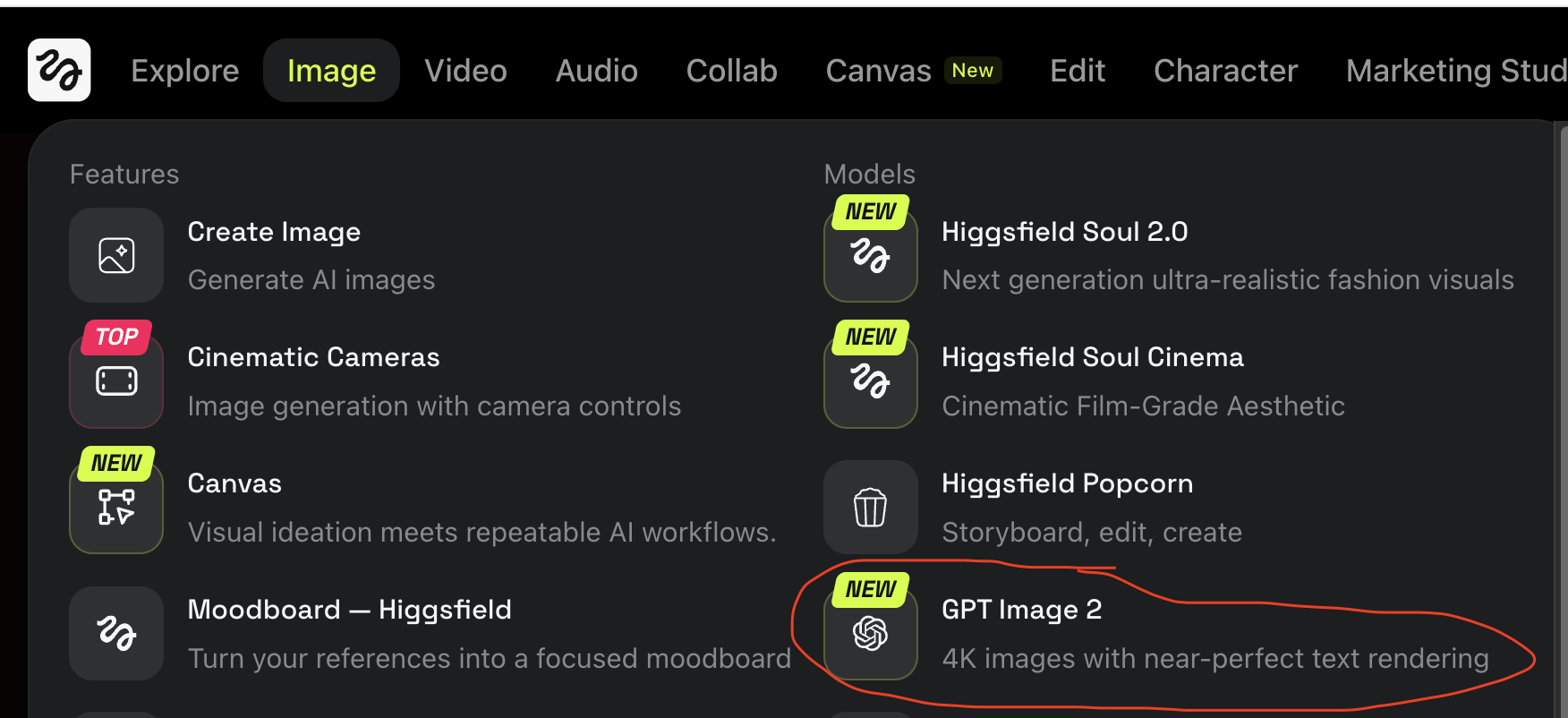
Tool: Higgsfield. Image tab in the top nav, then GPT Image 2 under the Models column.
- Open Higgsfield
- Click the Image tab in the top navigation
- Under the Models column on the right, click GPT Image 2 (described as "4K images with near-perfect text rendering")
- Upload your portrait photo as the character reference
- Paste the prompt below, after replacing the highlighted
[[BRACKETS]] with your details
- Click generate
- Wait 30 to 60 seconds for the storyboard sheet to render
In Higgsfield: Image tab → Models column → GPT Image 2.
Before You Paste: Replace The Highlighted Fields
Anything wrapped in [[BRACKETS]] is yours to fill in. Replace each highlighted token with your own detail. Use find-and-replace if a placeholder appears more than once. The brackets and the field name should both be replaced (e.g., [[YOUR ETHNICITY]] becomes South Asian or Caucasian or Black, etc.). Anything not in brackets stays as-is.
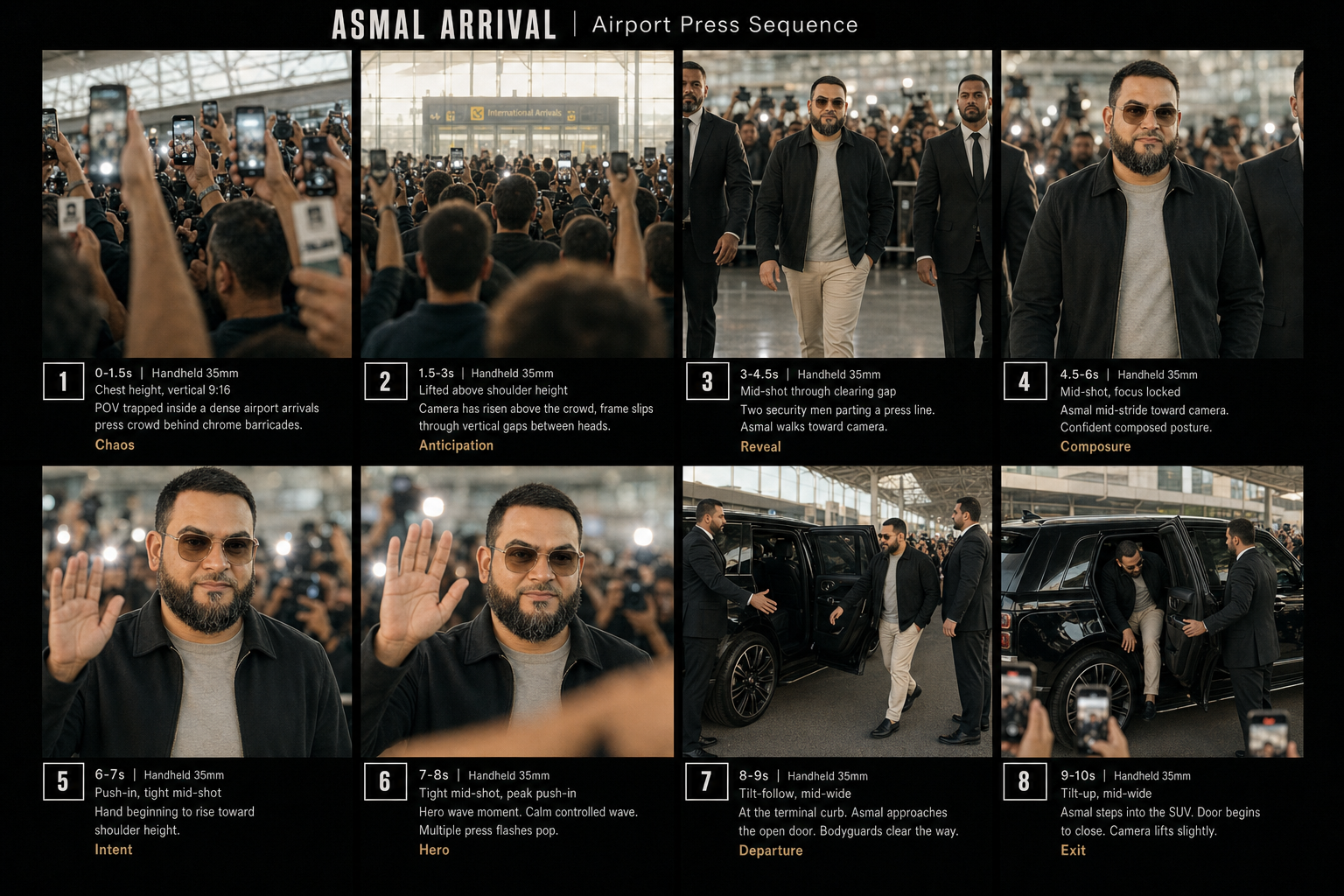
Create a professional storyboard reference sheet titled "[[YOUR PROJECT TITLE]] Arrival" displayed as a 4x2 grid against a deep matte-black cinematic background. Each panel must be clearly numbered and include shot details below it.
LAYOUT:
- Top header banner: "[[YOUR PROJECT TITLE]] ARRIVAL | Airport Press Sequence" in clean modern white sans-serif typography
- 8 panels arranged in a 4x2 grid (4 wide, 2 tall)
- Each panel is framed in 9:16 vertical aspect ratio
- Below each panel: numbered tag, shot duration, lens / camera notes, brief action description, single-word mood label
- Cohesive cinematic color grade across all panels: warm daylight, beige and grey tones, chrome and glass accents
PANEL 1: 0-1.5s | Handheld 35mm, chest height, vertical 9:16
POV trapped inside a dense airport arrivals press crowd behind chrome barricades. Foreground stacked tall: raised arms in lower third holding press cards and phones, multiple phone screens midframe blocking the view, glass airport ceiling visible at the top. Bright camera flashes strobe across the foreground. Motion blur on closest moving arms. Subject NOT visible.
Mood: Chaos
PANEL 2: 1.5-3s | Handheld 35mm, lifted above shoulder height
Camera has risen above the crowd, frame slips through vertical gaps between heads. Distant airport arrival gate visible in upper third of frame, soft and backlit with atmospheric haze. Lower two-thirds filled with the backs of heads and raised phones. Subtle anamorphic lens flare on the gate light. Subject NOT yet visible.
Mood: Anticipation
PANEL 3: 3-4.5s | Handheld 35mm, mid-shot through clearing gap
Two security men in dark suits parting a press line on either side. The main subject (described in CHARACTER REFERENCE block below) framed head-to-mid-thigh, walking toward camera in the center of frame. Soft focus, just beginning to resolve into sharpness. Compact escort partially visible at frame edges. Polished terrazzo floor below. Atmospheric haze separates planes.
Mood: Reveal
PANEL 4: 4.5-6s | Handheld 35mm, mid-shot, focus locked
Same main subject now in crisp focus, mid-stride toward camera. Confident composed posture, slight subtle smile. Sunlight catches the gradient sunglasses lenses. Background press in soft bokeh. Two security in dark suits flanking him at the edges of frame. Crowd phones visible at frame edges raised high.
Mood: Composure
PANEL 5: 6-7s | Handheld 35mm push-in, tight mid-shot
Same subject centered, head in upper third of frame per vertical safe-zone composition. Camera has pushed closer via operator footwork. Hand beginning to rise from his side toward shoulder height in the start of a wave gesture. Subtle smile holds. Press flashes pop in background.
Mood: Intent
PANEL 6: 7-8s | Handheld 35mm, tight mid-shot, peak push-in
Hero wave moment. Same subject centered. Right hand fully raised in a calm controlled wave kept within the center column of the frame. Head tilts slightly. Subtle confident smile holds. A fan's blurred arm crosses the lower foreground partially occluding the bottom edge. Multiple press flashes pop. Shallow depth of field, subject in tack-sharp focus, crowd in soft bokeh.
Mood: Hero
PANEL 7: 8-9s | Handheld 35mm tilt-follow, mid-wide
At the terminal curb. A glossy black luxury SUV fills the lower two-thirds of the frame, polished paint reflecting blurred figures of the crowd. Rear passenger door swung open outward into the frame. Two bodyguards in dark suits flank the open door, one holding it open with one hand, the other shielding the gap from the crowd with an outstretched arm. Same main subject mid-motion approaching the door.
Mood: Departure
PANEL 8: 9-10s | Handheld 35mm tilt-up, mid-wide
Same SUV. Same main subject ducking and stepping into the back seat in a single fluid motion, one foot still on the ground, head bent slightly to clear the door frame. Bodyguard hand on the door beginning to close it. Tinted rear window catches a glint of light. Terminal overhang visible at top of frame. Raised vertical phone screens visible at the bottom edge. Camera lifting slightly.
Mood: Exit
CONSISTENCY RULES:
- Same main subject face, hair, beard, skin tone, and proportions across every panel where he appears (Panels 3, 4, 5, 6, 7, 8)
- Identical wardrobe across Panels 3 through 8: open matte-black fleece zip-up jacket, light grey crew-neck t-shirt underneath, beige tailored cream trousers with slight ankle break, transparent beige square-frame sunglasses with subtle gradient lenses, no logos, no jewelry, no watch
- Same airport terminal setting throughout: glass curtain walls, polished terrazzo floor, chrome barricades, atmospheric haze
- Same black luxury SUV in Panels 7 and 8 (matte-finish polished black paint, blacked-out windows, premium European or American executive SUV silhouette)
- Cohesive warm-daylight cinematic color grade across all panels
- Photo-realistic professional film-still quality throughout, no illustrated or cartoon styling
CHARACTER REFERENCE, UPLOAD WITH THIS PROMPT:
The uploaded reference image is the main character.
- Match the face, hair, [[FACIAL HAIR OR CLEAN-SHAVEN]], skin tone, and any distinguishing features exactly from the reference photo
- [[YOUR ETHNICITY]] [[MALE OR FEMALE]], [[YOUR AGE RANGE]], [[YOUR HAIR DESCRIPTION]], [[YOUR FACIAL HAIR DESCRIPTION]], [[YOUR SKIN TONE]], [[YOUR EYE COLOR]], defined eyebrows, calm composed expression, [[YOUR BUILD]]
- Apply this likeness to Panels 3, 4, 5, 6, 7, 8
- Maintain absolute identity consistency across every one of those panels
- Wardrobe locked across all panels exactly as described in the consistency rules above
- The subject is NOT visible in Panels 1 or 2 (camera is buried in the crowd searching)
Style: Photo-realistic cinematic film still aesthetic, documentary press-arrival cinematography, Champions League broadcast realism, soft film grain, natural color grade, professional 35mm lens character throughout.
Example fills, if you need them:
[[YOUR PROJECT TITLE]] = your last name or a short label (e.g., Asmal, Khan, The Founder) ·
[[YOUR ETHNICITY]] = South Asian, Caucasian, Black, East Asian, Latino, Middle Eastern, etc. ·
[[YOUR HAIR DESCRIPTION]] = short cropped dark hair, shoulder-length blonde hair, shaved head, etc. ·
[[YOUR FACIAL HAIR DESCRIPTION]] = full dark beard, trimmed mustache, clean-shaven, etc.
Example output from this exact prompt. Eight panels covering the full crowd, reveal, wave, and SUV exit sequence.
Review the storyboard
Go through all 8 panels. Check that your face, wardrobe, and the airport setting look right across each one. If a panel is off, like your face drifts, the wardrobe changes, or the camera angle feels wrong, tell the model exactly which panel and what to change, then regenerate. You don't have to redo the whole sheet.
When everything checks out, download the storyboard image. You'll need it for Step 3.
3
Generate the video, still in Higgsfield
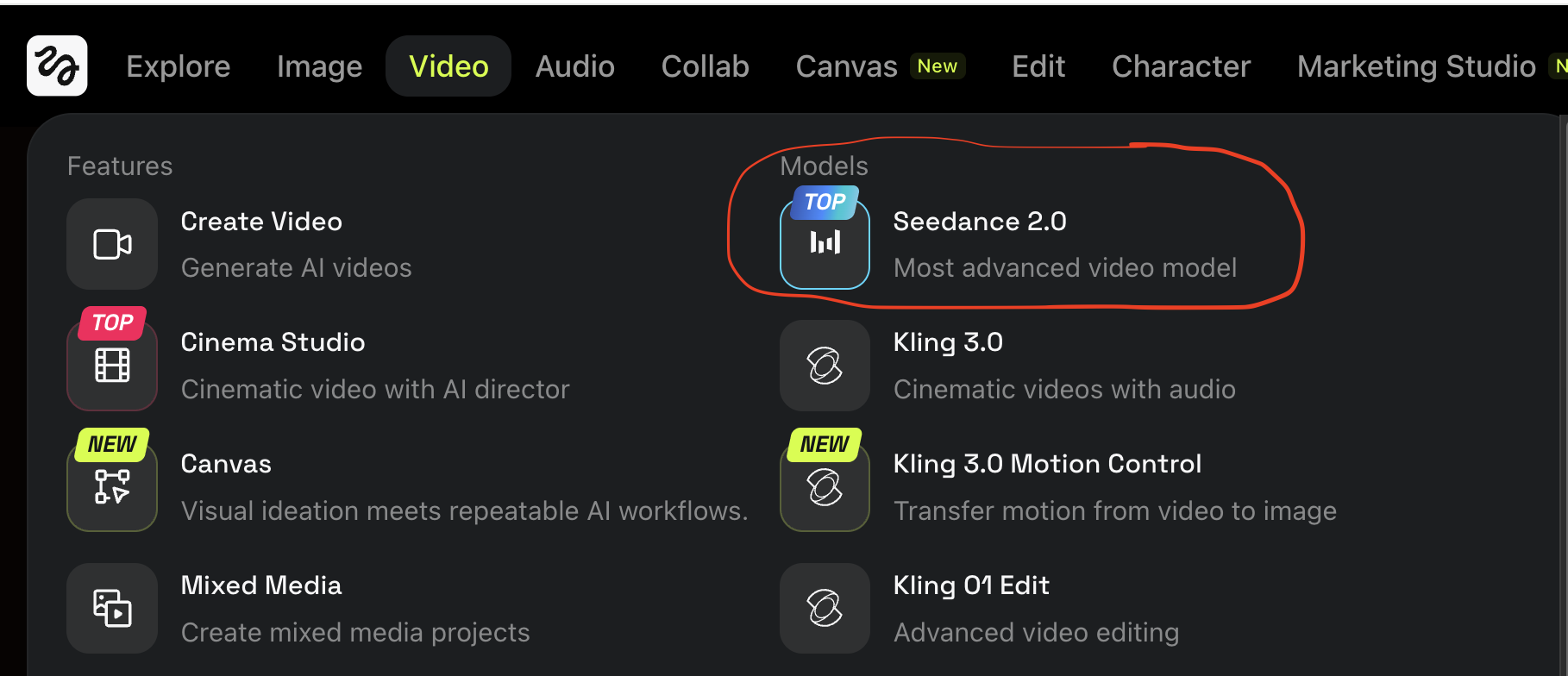
Stay in Higgsfield. Switch to the Video tab in the top nav, then Seedance 2.0 under the Models column.
- In Higgsfield, click the Video tab in the top navigation
- Under the Models column on the right, click Seedance 2.0 (marked "TOP", described as "Most advanced video model")
- Set aspect ratio to 9:16 vertical
- Set duration to 10 seconds
- Upload two reference images:
- Image 1: the storyboard sheet you just generated in Step 2
- Image 2: your original portrait photo (same one you used in Step 2)
- Paste the prompt below
- Click generate
- Wait 1 to 3 minutes for the render
In Higgsfield: Video tab → Models column → Seedance 2.0.
10-second cinematic celebrity arrival sequence. 9:16 vertical, 1080x1920, photo-realistic documentary realism with handheld press cinematography.
@image1 is the master storyboard reference. Match the exact look, lighting, color grade, character details, airport setting, SUV, and atmosphere shown across all 8 panels.
@image2 is the main character ([[YOUR ETHNICITY]] [[MALE OR FEMALE]], [[YOUR AGE RANGE]]). Match the face, hair, [[FACIAL HAIR OR CLEAN-SHAVEN]], skin tone, and identity exactly in every shot the subject appears in (shots 3 through 8).
SETTING: Major international airport arrivals hall, glass curtain walls overhead, polished terrazzo floor, chrome barricades restraining a dense international press crowd, terminal curb with a glossy black luxury SUV waiting.
THE SEQUENCE, 8 shots in 10 seconds:
0-1.5s: POV buried at chest height inside the press crowd behind chrome barricades. Foreground packed with raised arms and phone screens, glass ceiling at top of frame. Crowd surges, press flashes strobe foreground, camera jostles laterally with handheld micro-shake. Subject not visible.
1.5-3s: Camera lifts above shoulder height through gaps between bodies. Distant arrival gate enters upper third of frame, focus hunts once then settles, subtle anamorphic flare on gate light. Crowd phones still in foreground. Subject not yet visible.
3-4.5s: Two security in dark suits part the front line. @image2 emerges from soft focus walking toward camera with compact escort flanking him. Lateral camera shake from crowd push then steadies. Sunlight begins to catch the gradient sunglasses lenses.
4.5-6s: Focus pulls fully to crisp on @image2 as he continues walking toward camera. Confident composed mid-stride. Subtle smile. Background press in soft bokeh. Polished terrazzo reflects below.
6-7s: Slow handheld push-in via operator footwork. @image2 centered in frame, head in upper third per vertical safe-zone composition. Right hand begins to rise from his side toward shoulder height.
7-8s: Hero wave beat. @image2 raises his right hand fully in a calm controlled wave kept within the center column. Head tilts slightly, subtle smile holds. A fan lunges across foreground briefly occluding the lens. Multiple press flashes pop. Crowd roar peaks.
8-9s: Camera tilts to follow as @image2 reaches the glossy black luxury SUV at the curb. Two bodyguards in dark suits flank the open rear passenger door, one holding it, one shielding the gap from the crowd. Polished black paint reflects the blurred crowd.
9-10s: @image2 ducks and steps into the back seat in one fluid motion. Bodyguard closes the door with a firm clunk. SUV idle builds to a controlled rev. Camera lifts above a sea of raised vertical phone screens.
STYLE: Photo-realistic documentary press-arrival cinematography. Champions League broadcast realism. Soft natural film grain. Warm daylight color grade with chrome and glass accents. 35mm lens character throughout. Single continuous handheld take, no cuts.
CAMERA: Handheld phone-style portrait grip. Natural breathing micro-shake. One organic operator-driven push-in via footwork (not optical zoom). Brief focus hunt then lock. Lateral shake spikes during crowd interaction beats. Tilt-follow on the SUV entry.
AUDIO: Native diegetic only. No music, no score. Dense crowd roar, overlapping multilingual shouts, rapid DSLR shutter bursts, phone notification pings, distant PA announcement reverb, sneaker squeaks on polished floor, fabric rustle, security radio chatter, heavy SUV door clunk on close, engine idle building to controlled rev.
CRITICAL CONSISTENCY:
- Match @image2 face, hair, [[FACIAL HAIR OR CLEAN-SHAVEN]], skin tone, and proportions across every shot from 3-10s. Absolute identity lock.
- Wardrobe lock across all subject shots: open matte-black fleece zip-up jacket, light grey crew-neck t-shirt underneath, beige tailored cream trousers with slight ankle break, transparent beige square-frame sunglasses with gradient lenses. No logos, no jewelry, no watch.
- Same airport terminal setting throughout (glass walls, terrazzo floor, chrome barricades).
- Same black luxury SUV from 8-10s (polished black paint, blacked-out windows, premium executive silhouette).
- Cohesive warm-daylight color grade across the whole 10 seconds.
- Subject and key action stay within center 60% horizontally and inside the 1080x1320 vertical safe zone (top 220px and bottom 380px reserved for platform UI overlay).